Build · Web applications

Web applications that balance speed and usability

From customer-facing platforms to internal tools, we develop web applications that are fast, easy to use and flexible enough to change with your business.

The service

Web applications people reach for every day

A web application is software that runs in the browser: a customer portal, an ordering or booking system, an intranet, an admin console or a full platform. Unlike a website, it is built around tasks rather than pages. People sign in, enter and find information, and get work done, on any device, with nothing to install and updates that reach everyone at once.

Web applications suit organisations that want customers to serve themselves, partners to order or collaborate online, or staff to share one reliable tool instead of several. Good ones load quickly, guide people through each task without a manual, respect each user’s permissions, work with keyboards and screen readers, and stay fast as data and users grow. They are also easy to change, because businesses rarely stand still for long.

The commercial value shows up in fewer phone calls and emails, faster orders, cleaner data and happier customers. A web application can also become the shared foundation for everything else: the same platform and APIs can serve a mobile app, a partner integration or an AI assistant later, so the investment keeps paying back as your needs change over the years.

app.example.com.au
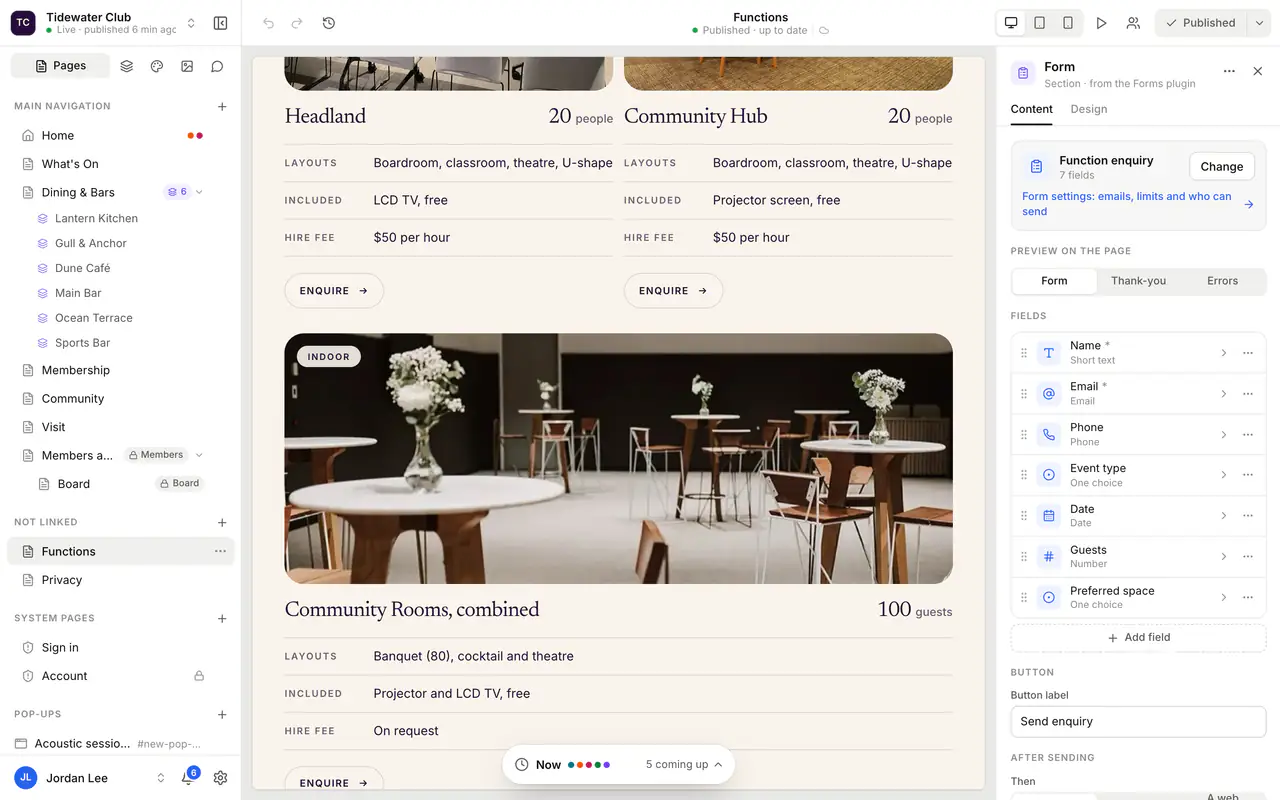
A form builder inside a web application

Fast by design

Modern frameworks, efficient data access and hosting tuned for real traffic.

Built for your users

Customers, staff and partners each get the screens and permissions they need.

Every device

Responsive interfaces that work on desktops, tablets and phones.

Is it right for you?

This is for you if…

  • Customers phone or email for things they could easily do themselves online
  • Partners or offices order through emails, attachments and phone calls
  • Staff use several disconnected tools, or an intranet nobody can search
  • You want one platform that could later serve mobile apps or partners too
The problem

Sounds familiar?

If two or more of these ring true, this is where we can help.

  1. 01

    Customers phone or email for things they could do themselves

  2. 02

    Offices and partners order through emails and attachments

  3. 03

    Your intranet is out of date and hard to search

  4. 04

    Different teams use different tools for the same job

What’s included

What we deliver

Every engagement is scoped to your goals. These are the pieces we are asked for most.

01

User journeys and requirements

Each type of user, the tasks they need to complete and the data behind each step, written down and agreed, so the build is focused on the outcomes that matter.

02

Interface design and prototypes

Clickable prototypes tested with real users before development, catching confusing steps and missing information early, when changes are cheap, rather than after launch when they are not.

03

Front end and back end

A responsive interface and the server, database and business logic behind it, built with the same modern frameworks we use in our own products every day.

04

Secure sign-in and permissions

Logins, single sign-on where needed, and role-based access, so customers, staff and partners see only what they should, and every action is recorded and accountable.

05

APIs and integrations

Clean APIs that connect the application to your existing systems and leave the door open for mobile apps, partner connections and automation in the future.

06

Performance, accessibility and security checks

Load testing, accessibility review against WCAG guidelines and security testing before go-live, so the application is fast, usable by everyone and ready for real traffic.

Customer portals and self-serviceBooking, ordering and request systemsWeb-to-print and brand asset orderingIntranets and secure document librariesAdmin consoles and back-office toolsProgressive web apps
Decisions worth getting right

Getting the big calls right

A web application or a mobile app?

Start with where and how people will use it. For work done at a desk, occasional use or a wide audience, a responsive web application reaches everyone with no install and one codebase. A native app earns its place when people use it daily on the move, need offline access, or rely on notifications and device features. Many products start on the web and add an app later.

Single-page app or server-rendered pages?

Highly interactive tools, like editors and dashboards, benefit from a rich app that runs in the browser. Content-heavy or public pages are better rendered on the server, so they load quickly and can be found in search. Modern frameworks let one application do both, and we choose the balance page by page rather than applying one rule everywhere.

Off-the-shelf portal or custom build?

If a portal product already covers most of what you need, configure it and save the time. Build custom when the journeys, rules or integrations are specific to your business, or when the portal is part of what customers buy from you. A quick review of the options during discovery usually makes the answer clear.

How it runs

How a web applications project runs

Typical stages and how long each usually takes. Your plan is set during discovery, with working software to see at every stage.

How we work

  1. Define

    2–4 weeksUsers, journeys, data and integrations explored in workshops and interviews. You get a scope, an architecture outline, priorities for the first release and an estimate.

  2. Prototype and design

    3–6 weeksClickable prototypes tested with real users, then refined into detailed designs. You get approved screens, a design system and confidence that the journeys work.

  3. Build in increments

    2–5 monthsFront end, back end and APIs delivered in short cycles with working demos. You get a test environment to try each feature and regular chances to adjust priorities.

  4. Launch and improve

    2–4 weeks, then ongoingPerformance, accessibility and security checks, data loading, go-live and early support. You get a live application, monitoring and a backlog of improvements based on real use.

Experience

Where we have done this

Real projects for real clients, from our own archive and the products we run today.

Today

Marketing Help

A web-to-print portal where offices order on-brand campaign material, with artwork rendered by Adobe InDesign Server.

2015

Sports Masters Athletics International

A B2B ecommerce portal for more than 2,000 products.

2015

Novis (MediDirect)

A B2B ordering portal for medical products.

2015

HTC Australia

An intranet store for HTC’s own staff.

Built on our products

Start from something proven

Where one of our products already solves part of the problem, we build on it rather than from scratch.

Questions

Common questions

Will the application work on phones and tablets?

Yes. Everything we build is responsive, and we design the most common tasks for small screens first. For people who use the application on the move, it can also be installed as a progressive web app, with an icon on the home screen and some offline features, without going through an app store.

How do you make web applications accessible?

We design and test against the WCAG guidelines from the start: keyboard navigation, screen reader labels, colour contrast, clear error messages and sensible focus order. Accessibility built in from the first design costs far less than fixing it later, and it makes the application easier for everyone, not only people with a disability.

How fast will it be?

Speed is designed, not hoped for. We set performance targets early, keep pages light, load data efficiently and host close to your users on modern edge infrastructure, the same approach we use for QuoteCloud. Before launch we test with realistic data volumes and traffic, so the application stays quick as it grows.

Can you add features after launch?

Yes. Most web applications grow steadily after go-live as real use shows what people need next. We structure the code so new features are added without disturbing what works, and automated tests check every release. Many clients keep a regular release rhythm with us rather than saving changes for big projects.

Where will our application be hosted?

Usually on modern cloud infrastructure, chosen to suit your users, data and obligations. We can host and manage it for you, with monitoring, backups and updates, or deploy to your own cloud account if you prefer to hold it directly. Either way, the environment is documented and you always have access to your data.

Which technologies do you use?

We choose the stack to suit the project: React, Angular, Node.js, .NET, Java and PHP on the application side, with SQL Server, MySQL or Oracle for data.

Need software built around the way your business actually runs?

Whether you’re planning a new SaaS product, custom business software, a mobile app or a better digital workflow, we’d love to hear what you’re working on.