Build · Mobile app development

Mobile apps that keep people connected on the move

We build mobile experiences that keep customers, teams and travellers connected wherever they are, from native iOS and Android apps to phone-first web apps.

The service

Apps that earn a place on the home screen

Mobile app development covers native apps for iPhone and Android, the APIs and platforms behind them, and the work of getting them through the App Store and Google Play. A good app does a few things very well for people on the move: it opens instantly, works without a signal, sends the right alert at the right moment and feels at home on the device.

Apps suit businesses whose customers, travellers or field staff need information or actions away from a desk, often every day. They also suit products where notifications, location, the camera or offline access make a real difference. If people only need something occasionally, a phone-first web app may serve them better, cost less to build, and we will tell you so honestly.

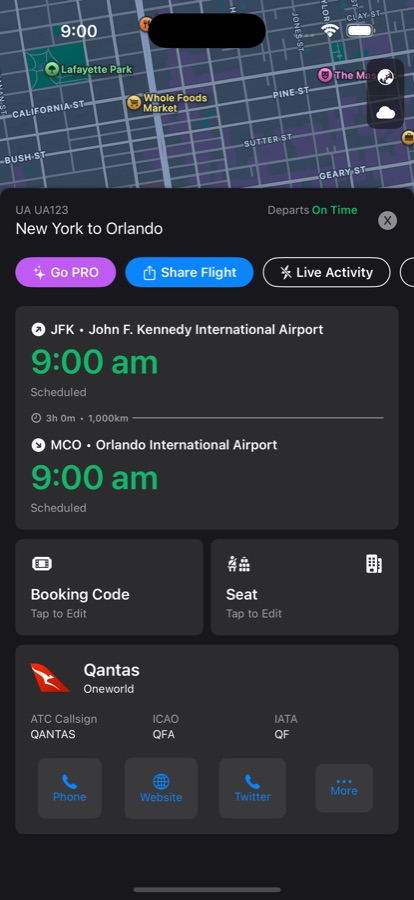
Commercially, an app keeps your brand in your customers’ pockets and opens a direct channel through notifications, but only if people keep it installed. Most apps are deleted soon after download, so the value comes from solving a real, repeated need. TravelDocs, our own native app, exists because travellers need their whole trip with them, online or off, wherever they happen to be.

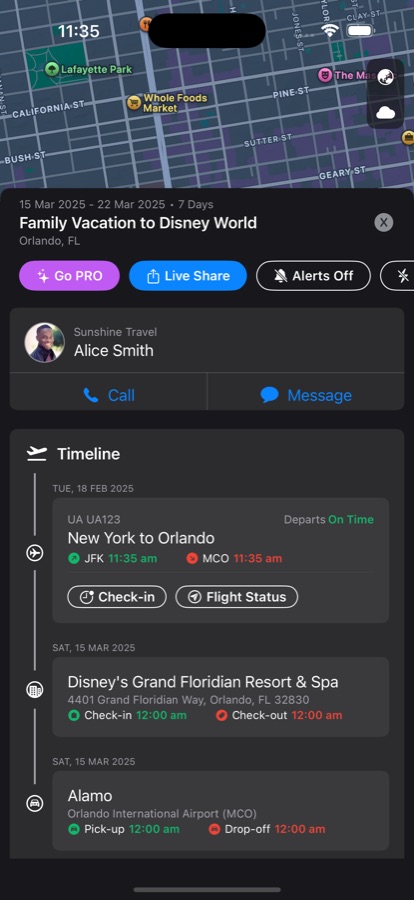
TravelDocs app screen

Native where it matters

Swift for iOS and Kotlin for Android when you need performance, notifications and device features.

Offline-first

Data saved on the device so the app keeps working without a connection.

Synced with your platform

Apps that share data, accounts and content with your web platform.

Is it right for you?

This is for you if…

  • Your customers or staff need information on the move, often with a weak signal
  • Timely alerts or live updates would change how people act or respond
  • A PDF, an email or a mobile website is doing the job of an app today
  • You already have a web platform and want an app that shares its accounts and data
The problem

Sounds familiar?

If two or more of these ring true, this is where we can help.

  1. 01

    Your customers need information on the move, often without a signal

  2. 02

    A PDF attached to an email is your “app” today

  3. 03

    People need an alert the moment something changes

  4. 04

    Staff in the field capture information on paper

What’s included

What we deliver

Every engagement is scoped to your goals. These are the pieces we are asked for most.

01

App strategy and scope

A clear decision about which jobs belong on the phone, which stay on the web, and what the first version must do to be worth installing and keeping.

02

Native interface design

Designs that follow Apple and Android conventions, support light and dark mode, large text and screen readers, so the app feels familiar and works for everyone.

03

iOS and Android development

Apps built in Swift and Kotlin, or a shared approach where it suits, tested on a range of real devices rather than only on simulators.

04

Offline data and sync

Information stored on the device and kept in step with your platform, so the app stays useful in a plane, a basement or a remote site without a signal.

05

Notifications and device features

Push notifications, widgets, Live Activities, location and camera features used where they genuinely help, with permissions requested at the moment they make sense to the person using the app.

06

Store publishing and releases

App Store and Google Play listings, privacy details, review submissions, crash reporting and a steady, well-tested release process, so every update reaches users reliably and on time.

Native iOS and Android appsPush notifications and live updatesOffline storage and syncApple Watch, widgets and Live ActivitiesPhone-first web appsApp Store and Google Play publishing
Decisions worth getting right

The choices behind a good app

Native apps, a shared codebase or a phone-first web app?

Native Swift and Kotlin apps give the best performance and the fullest access to device features such as widgets, watch apps and Live Activities, but they mean two codebases. Cross-platform frameworks share most of the code and can be quicker for simpler apps. A phone-first web app avoids the stores entirely. The right answer depends on how often people use it and which device features matter.

What should the first version include?

Choose the one or two jobs people will come back for, and make those excellent. Sign-in, offline access and notifications are often worth getting right early because they are hard to retrofit. Everything else can follow in regular updates, once analytics and store reviews show what people actually do with the app.

Does the app need its own back end?

Almost always it needs one, but it rarely needs a separate one. The best results come when the app shares accounts, data and APIs with your existing web platform, so information is entered once and appears everywhere. If your platform has no suitable API yet, building that API is often the first and most valuable part of the project.

How it runs

How a mobile app development project runs

Typical stages and how long each usually takes. Your plan is set during discovery, with working software to see at every stage.

How we work

  1. Discovery and planning

    2–4 weeksUsers, key tasks, device features and the platform the app will connect to. You get a scoped first version, a technical approach and an estimate.

  2. UX and interface design

    3–6 weeksNative designs and clickable prototypes tested on real phones. You get approved screens for iOS and Android, including accessibility, light and dark mode.

  3. Development and testing

    3–6 monthsApps and their APIs built in short cycles, with test builds shared through TestFlight and Google Play testing tracks. You get working builds to try on your own devices throughout.

  4. Store launch and support

    2–4 weeks, then ongoingStore listings, review submissions, launch and monitoring, then regular updates for new operating system versions and features. You get a live app and a release plan.

Experience

Where we have done this

Real projects for real clients, from our own archive and the products we run today.

2025

TravelDocs

Native iOS and Android: offline itineraries, Live Activities, widgets, Arrived Safe and SOS.

See the work
2014

Concierge Group

A business travel app with itineraries and expense tracking.

2014

Jetmaster

A fireplace design app for architects and home owners.

2015

Samsonite

iPad competition kiosks in major Australian airports.

Built on our products

Start from something proven

Where one of our products already solves part of the problem, we build on it rather than from scratch.

Questions

Common questions

How long does App Store and Google Play review take?

Reviews often take a day or two, but first submissions and busy periods can take longer, and a rejection adds another round. We build store review into the launch plan rather than leaving it to the last week, prepare privacy details and test accounts in advance, and avoid tying a launch event to an exact approval date.

Will the app work without an internet connection?

It can, and for many apps it should. We store the information people need on the device, let them keep working offline, and sync changes when a connection returns. TravelDocs works this way, so travellers can see their itinerary in flight or overseas without data. We decide early what must work offline, because it shapes the whole design.

How do you keep the app up to date?

Apple and Google release new operating system versions every year, and devices change constantly. We test against beta releases, update libraries, fix crashes reported in the field, and ship regular updates. An app that is not maintained soon starts to feel dated or stops working well, so we plan ongoing support from the start.

Can our app send notifications to specific people?

Yes. Notifications can target individuals, groups, locations or events, such as a flight change or an approval waiting. The key is restraint: people turn off apps that interrupt too often. We help you decide which messages are worth sending, ask for permission at the right moment, and give users simple controls.

Who publishes the app, us or you?

Usually the app is published under your own Apple and Google developer accounts, so it carries your name and you keep control of the listing. We set up and manage the releases for you, from builds and screenshots to review submissions. If you prefer, we can guide your team to handle releases in house.

Do you build native or cross-platform apps?

Both. TravelDocs, our own app, is native on iOS and Android. For simpler needs a phone-first web app can be faster and cheaper.

Need software built around the way your business actually runs?

Whether you’re planning a new SaaS product, custom business software, a mobile app or a better digital workflow, we’d love to hear what you’re working on.