Run · QuoteCloud set-up and templates

QuoteCloud, set up for your team

Our onboarding and professional services teams convert your quotes and proposals into QuoteCloud templates, load your products and connect QuoteCloud to the systems you use, so your team starts sending on day one.

The service

Your quotes, rebuilt to win more work

QuoteCloud gives sales teams interactive quotes, proposals and contracts that clients can read, sign and pay online. Getting full value from it takes more than signing up: your existing documents need converting into templates, your products and pricing need loading, and QuoteCloud needs connecting to the systems your team already uses. Our onboarding and professional services teams do that work with you, so the first document your team sends looks and works the way it should.

It suits businesses that quote often and want every quote to look and read the same: IT and managed service providers, trades and solar installers, agencies, professional firms, and travel agencies building itineraries. It helps most when quotes are Word or PDF files that each salesperson changes in their own way, when pricing has options that are easy to get wrong, or when one deal is typed into three different systems.

A well set-up account pays its way quickly. Templates with approved wording and pricing cut the time it takes to produce a quote, interactive pricing tables let clients choose options without another round of emails, and eSign closes the deal in the same document. When quotes start from your CRM and flow on to accounting, nothing is keyed twice, and managers can see where every deal sits from Sent to Paid.

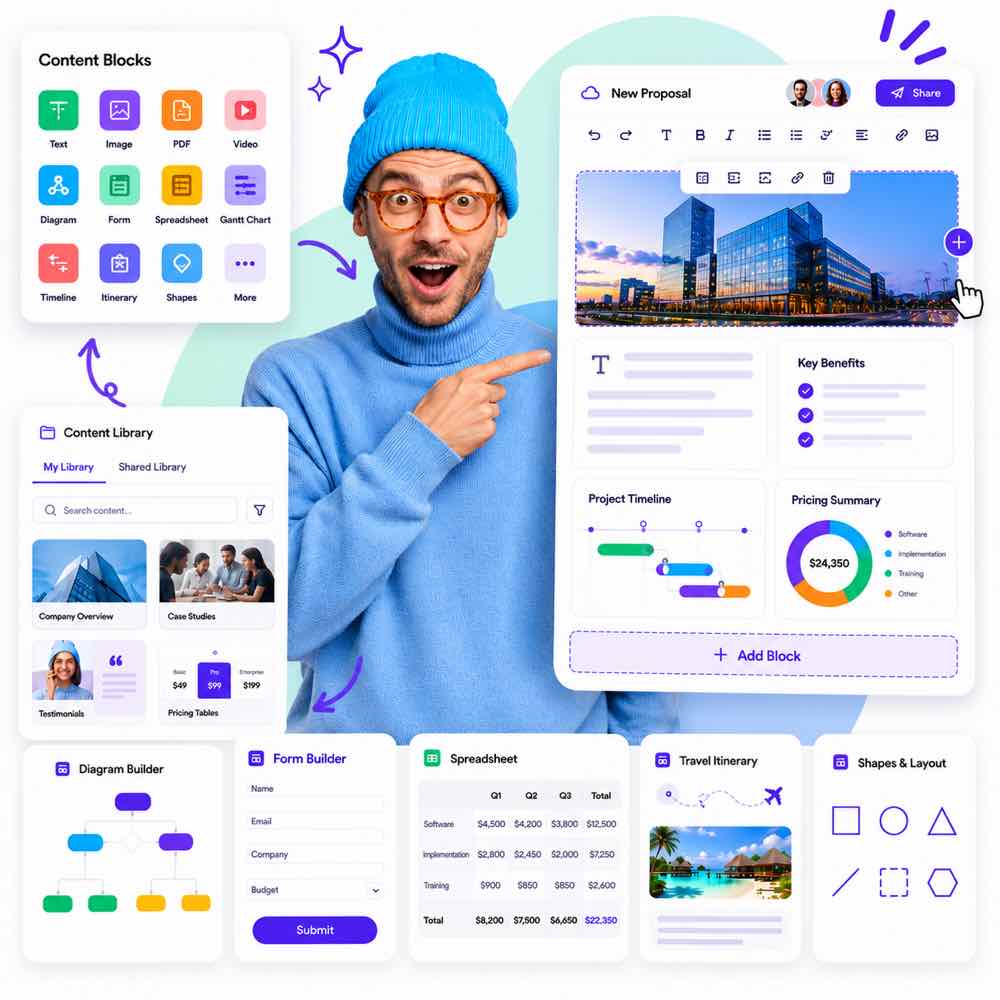
A branded proposal template in QuoteCloud

Templates that match your brand

Your fonts, colours and layouts, designed for every page size you need.

Products and pricing loaded

Your catalogue, bundles and pricing rules ready to quote.

Connected

CRM, accounting and travel systems linked up.

Is it right for you?

This is for you if…

  • You send a steady stream of quotes or proposals and want them consistent across the team
  • Your pricing has options, bundles or discounts that are easy to get wrong by hand
  • You want QuoteCloud working properly without taking your own staff off sales for weeks
  • You want quotes created from Salesforce, your CRM or your booking system without re-keying
The problem

Sounds familiar?

If two or more of these ring true, this is where we can help.

  1. 01

    Your quotes are Word templates that everyone edits differently

  2. 02

    Pricing mistakes reach customers

  3. 03

    You cannot tell whether a proposal has been opened

  4. 04

    Quotes are typed again into your CRM or accounting system

What’s included

What we deliver

Every engagement is scoped to your goals. These are the pieces we are asked for most.

01

Template design and conversion

Your current quotes, proposals and contracts are rebuilt as QuoteCloud templates in your fonts and colours, with approved wording kept in place and the parts each salesperson should change made obvious.

02

Product library and pricing

Your catalogue is loaded with descriptions, prices, tax and discounts, ready for pricing tables. Bundles, optional items and alternatives are set up so clients can choose and watch the total update in front of them.

03

Content libraries

Case studies, terms, team profiles and standard sections are organised into team and company libraries, so salespeople add approved content in one click instead of copying it from old documents.

04

Integrations

Salesforce Sync, or Zapier and Make connections to your CRM, accounting or job management apps, configured and tested with real records. For your own platforms, the REST API and MCP server can create documents directly.

05

Users, roles and approvals

Users, teams and permissions are set up to match how you sell, with an approval workflow so large discounts are signed off by the right person before a quote reaches the client.

06

Training and first documents

Hands-on sessions for salespeople and template owners, built around your own templates. Your team sends its first real documents with us alongside, and administrators learn how to keep templates current.

Template design and conversionProduct library set-upBranding and document stylesIntegration set-upTeam trainingPremium support with an account manager
Decisions worth getting right

Get these right before you build

How many templates do we really need?

Usually fewer than you think. Many businesses start with a dozen near-identical Word files that differ in only a few sections. A better approach is a small set of master templates, one for each type of document, with optional sections and content libraries covering the variations. That is quicker to set up, easier to keep current and makes reporting cleaner.

Where should our prices live?

If your CRM, accounting or ERP system is already the source of truth for products and prices, keep it as the master and agree how prices stay in step with QuoteCloud. If prices currently live in spreadsheets and people’s heads, the QuoteCloud product library can become the master. What matters is choosing one owner, so prices are never updated in two places.

Integrate on day one, or later?

Connecting your CRM early means quotes start from real opportunities and adoption is easier. But integrations add set-up and testing time, and they work best once templates and products are settled. A common path is to launch with templates and products first, then add Salesforce Sync, Zapier or Make connections a few weeks later, once the team is sending.

How it runs

How a quotecloud set-up and templates project runs

Typical stages and how long each usually takes. Your plan is set during discovery, with working software to see at every stage.

How we work

  1. Discovery and collection

    1–2 weeksWe gather your current documents, price lists, brand assets and details of the systems involved, and agree which templates, users and integrations come first. You get a clear set-up plan and timeline.

  2. Template design

    1–3 weeksTemplates are drafted in QuoteCloud, reviewed with you and refined. Pricing tables, content apps and the eSign step are arranged so each document reads well and is simple for salespeople to complete.

  3. Configuration and integration

    1–3 weeksProducts, libraries, users, roles and approval rules are loaded, and integrations are connected and tested with real records, so data flows the right way before anyone relies on it.

  4. Training and go-live

    1–2 weeksYour team is trained on its own templates and sends its first live documents with help close by. After go-live, early use is reviewed and templates are adjusted wherever people get stuck.

Experience

Where we have done this

Real projects for real clients, from our own archive and the products we run today.

Built on our products

Start from something proven

Where one of our products already solves part of the problem, we build on it rather than from scratch.

Questions

Common questions

Can you match our existing proposal design?

Very closely. QuoteCloud documents are interactive web documents rather than fixed print layouts, so your fonts, colours, imagery and structure are kept and the layout is adapted to read well on a phone as well as a desktop. Many teams also use the move as a chance to tidy their wording and drop sections nobody reads.

How long before our team is sending real quotes?

For a team with a few document types and a straightforward catalogue, four to ten weeks is typical, and simple accounts can move faster. The biggest factors are how quickly current documents and price lists are gathered, how many review rounds the templates need, and whether integrations are part of the first phase.

Which systems can you connect QuoteCloud to?

Salesforce through the Salesforce Sync add-on, and CRMs, accounting and job management apps such as HubSpot, Pipedrive, Xero and QuickBooks through Zapier and Make. For your own platforms, the REST API lets systems create documents, and the MCP server lets AI assistants do the same. We help you choose the simplest route for each connection.

Can we try QuoteCloud before planning a set-up?

Yes. There is a Free plan for one user, and every paid plan has a free 14-day trial. A good use of the trial is to build one real quote with your own products and send it to a colleague, so you see what your clients will experience before you plan the wider set-up.

Who looks after the templates after launch?

Your administrators can, and we train them to. Wording, prices and images are updated in the editor and your libraries without rebuilding templates, and the AI Co-worker can help with changes like updating a pricing table. When you need a new document type, a design refresh or another integration, our services team can take it on.

Need software built around the way your business actually runs?

Whether you’re planning a new SaaS product, custom business software, a mobile app or a better digital workflow, we’d love to hear what you’re working on.